
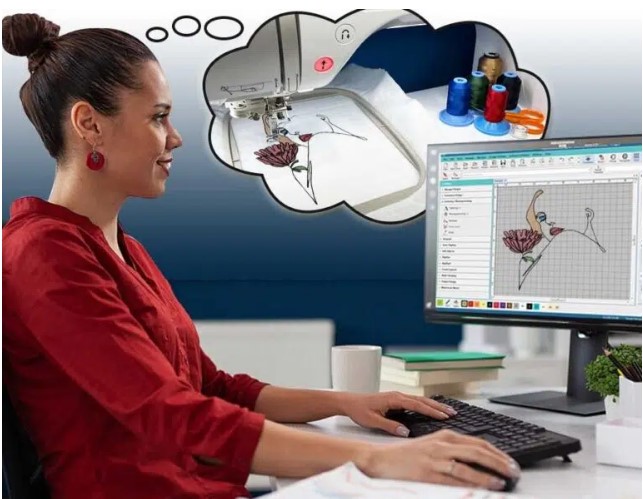
A reliable PES File Converter is one of the most important tools for anyone working with Brother or Baby Lock embroidery machines. Whether you’re converting a logo, artwork, or custom design, the quality of the PES file directly affects stitch accuracy, thread flow, and the final embroidered result. A poorly converted file can lead to broken threads, uneven stitching, or distorted designs problems no embroiderer wants to deal with.
In this detailed guide, we’ll explain what a PES file converter does, why professional conversion matters, and how clean, machine-ready stitch files can transform your embroidery projects from average to outstanding.
What Is a PES File and Why Does It Matter?
PES is a proprietary embroidery file format developed for Brother and Baby Lock machines. Unlike simple image files, PES files contain stitch-by-stitch instructions that tell the machine exactly how to sew a design.
A proper PES file includes:
- Stitch types and directions
- Color sequence information
- Density and underlay settings
- Trim and jump commands
If any of these elements are poorly defined, your embroidery machine will struggle even if the artwork looks perfect on screen.
What Does a PES File Converter Do?
A PES file converter transforms artwork or existing embroidery files into a PES format that your machine can read accurately. However, true conversion is much more than changing a file extension.
A professional converter:
- Rebuilds stitch paths from scratch
- Adjusts density based on fabric type
- Optimizes stitch order to reduce trims
- Ensures clean outlines and smooth fills
This ensures your design stitches exactly as intended, not just visually but structurally.
Why You Should Avoid Basic or Free PES Converters
Free or automated PES file converters often promise quick results, but they usually fall short in real-world embroidery.
Common Issues with Low-Quality Converters
- Excessive stitch counts
- Poor stitch direction
- No underlay support
- Inaccurate lettering
- Designs that pucker fabric
These tools simply translate shapes into stitches without understanding how embroidery behaves on fabric.
Professional PES Conversion vs. Auto Conversion
Let’s break down the difference:
Automated Conversion
- Fast but inaccurate
- No fabric consideration
- Limited stitch control
- High risk of embroidery errors
Professional PES Conversion
- Digitized manually by experts
- Optimized for specific fabrics
- Clean stitch flow
- Machine-tested logic
The difference shows clearly once the design is stitched.
Types of Files That Can Be Converted to PES
A professional PES file converter can handle many input formats, including:
- JPG & PNG images
- AI & EPS vector files
- PDF artwork
- SVG graphics
- DST, JEF, EXP, and other embroidery formats
Each file type requires a different approach to ensure the final PES file stitches cleanly.
Why Clean Stitch Files Matter
Clean stitch files are the backbone of professional embroidery. They reduce machine stress and improve production efficiency.
Benefits of Machine-Ready PES Files
- Fewer thread breaks
- Faster stitching
- Crisp edges and lettering
- Minimal fabric distortion
- Consistent results across runs
When your PES file is built correctly, even complex designs stitch smoothly.
PES Conversion for Logos and Branding
Logos often include fine details, small text, and sharp edges—making them challenging to convert.
A professional converter ensures:
- Text remains readable
- Borders stay sharp
- Color changes are optimized
- Stitch density matches logo size
This is especially important for corporate branding, where consistency matters.
PES File Conversion for Different Fabrics
Fabric type plays a huge role in how embroidery stitches behave.
Common Fabric Adjustments
- Caps & hats: Shorter stitches, strong underlay
- Towels: High-density stitching with nap control
- Stretch fabrics: Reduced density and flexible underlay
- Denim & canvas: Strong penetration with balanced tension
Professional PES conversion adapts stitch settings to match the fabric—not the other way around.
Common Mistakes in PES File Conversion
Avoid these common errors:
- Ignoring stitch direction
- Over-digitizing small details
- Using one density for all fabrics
- Forgetting pull compensation
- Skipping test runs
A professional approach prevents these problems before production begins.
Who Needs a Professional PES File Converter?
PES conversion isn’t just for large embroidery shops.
It’s ideal for:
- Home embroidery users
- Small businesses
- Apparel brands
- Promotional product companies
- Custom gift creators
If you want consistent, high-quality embroidery, professional conversion is worth it.
How to Get the Best PES Conversion Results
To ensure top-quality PES files:
- Provide high-resolution or vector artwork
- Share fabric type and hoop size
- Specify final design dimensions
- Avoid overly small text when possible
- Work with experienced digitizers
Clear communication leads to better stitch results.
Why Professional PES Conversion Saves Money
Although professional conversion may cost more upfront, it saves money long-term by:
- Reducing thread waste
- Preventing design rework
- Minimizing machine downtime
- Avoiding ruined garments
Quality digitizing pays for itself quickly.
Future-Proofing Your Embroidery Designs
High-quality PES files can be reused, resized, and adapted for future projects. With proper digitizing, your designs remain flexible and production-ready for years.
Final Thoughts
A professional PES File Converter is essential for anyone who wants clean, reliable, and machine-ready embroidery files. From logos and lettering to detailed artwork, proper PES conversion ensures smooth stitching, fewer errors, and professional-looking results on every project.
If you’re looking for expertly converted PES files that stitch flawlessly across fabrics and designs, Digitizing Buddy delivers precision, consistency, and embroidery-ready quality you can trust.

![Epoxy Curing Agents Market Growth Analysis Report | Industry Status, Market Opportunities, Key Challenges, Competitive Strategies, Revenue Breakdown, and Forecast Outlook [2025–2034]](https://driftelano.com/wp-content/uploads/2025/12/Epoxy-Curing-Agents-Market.jpg)
![EMI Shielding Market Insights and Analysis [2025–2034] | Industry Performance, Growth Opportunities, Risk Factors, Strategic Developments, and Long-Term Market Projections](https://driftelano.com/wp-content/uploads/2025/12/EMI-Shielding-Market.jpg)
![Dimethyl Ether (DME) Market [Latest Reports] | Business Environment Analysis, Corporate Strategies, Competitive Benchmarking, Investment Trends, and Emerging Market Developments [2025–2034]](https://driftelano.com/wp-content/uploads/2025/12/Dimethyl-Ether-DME-Market.png)
Leave a Reply